> ## Documentation Index
> Fetch the complete documentation index at: https://davinci.mintlify.site/llms.txt
> Use this file to discover all available pages before exploring further.
# Extended License
> Leverage full SaaS features of Davinci AI with Extended License at grow your business while earning real profit.
## Why do I need Extended License?
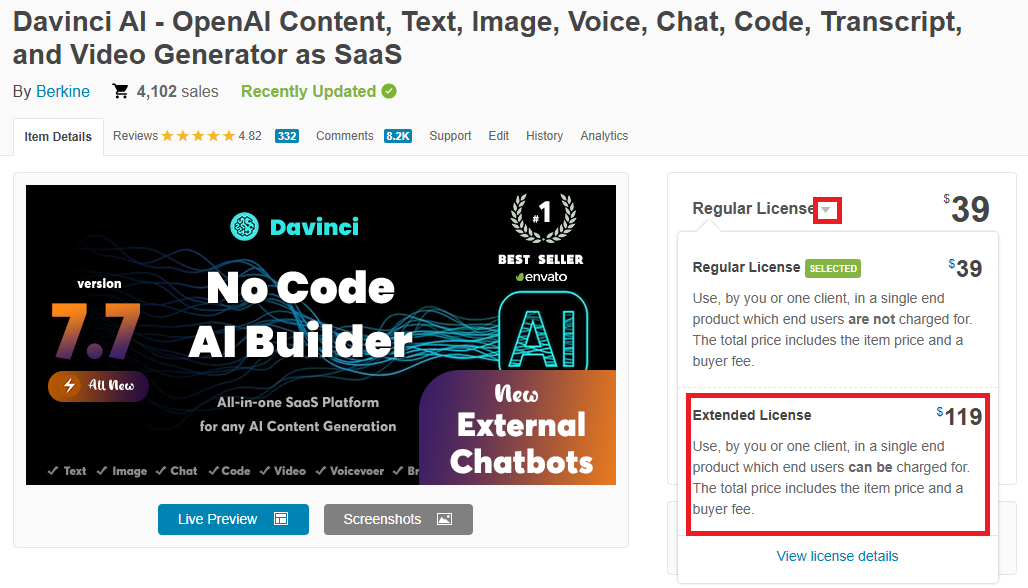
Codecanyon License policy requires you to have **Extended License** to be able to charge your end users. So if you don't have one, access to all SaaS features will not be available for you by default in Davinci AI. In case if you purchased a `Regular License`, you can always upgrade to `Extended License`.
## Where do you buy Extended License?
You can buy it directly in your codecanyon account.
1. Go to the [Davinci AI](https://1.envato.market/gbM0b5) page in codecanyon.
2. Click the dropdown button next to the Regular License sign and select **Extended License** in the list.
 ## What is the benefit of Extended License?
With **Extended License**, you will be able to charge your end users for usage of features in Davinci AI and have access to following list of SaaS features:
Create Monthly | Yearly | Lifetime plans
Create one time Prepaid plans
13 different payment gateways
Custom Promocodes for prepaid and lifetime plans
Let your users bring new customers and earn
Generate dynamic invoices
Generate gift cards for your customers
New wallet system to manager user funds
Advanced Finance Analytics dashboard
Generate Monthly, Yearly Financial reports
## Extra benefit
Save with Extended License. Following paid extensions are also currently `Free` as a limited promo `only` for Extended License users.
Cost 29\$
Cost 29\$
Cost 29\$
Cost 39\$
Cost 49\$
## What about my Regular License?
If you have purchased your `Regular License` **less** than **6 months** ago from the date of your `Extended License` purchase, then you are eligible for a refund for your Regular License.
Here how you can upgrade your license and request a refund for your Regular license in case if you are eligigle for one:
1. Get a new `Extended License` from your Codecanyon account.
2. Go to the **Admin Panel** -> **General Settings** -> **Activation** page and deactivate your Regular License in case if you have installed the script previously.
3. Next, while on that same **Activation** page, enter your **Envato Username** and your new **Extended License** and click activate. That is it, now you can install [SaaS Business](/saas/saas-business) extension from the Marketplace.
4. Now you can request a refund for your regular license in case if you purchased it 6 months ago. All requests are initiated via your codecanyon account, under the downloads page there.
## What is the benefit of Extended License?
With **Extended License**, you will be able to charge your end users for usage of features in Davinci AI and have access to following list of SaaS features:
Create Monthly | Yearly | Lifetime plans
Create one time Prepaid plans
13 different payment gateways
Custom Promocodes for prepaid and lifetime plans
Let your users bring new customers and earn
Generate dynamic invoices
Generate gift cards for your customers
New wallet system to manager user funds
Advanced Finance Analytics dashboard
Generate Monthly, Yearly Financial reports
## Extra benefit
Save with Extended License. Following paid extensions are also currently `Free` as a limited promo `only` for Extended License users.
Cost 29\$
Cost 29\$
Cost 29\$
Cost 39\$
Cost 49\$
## What about my Regular License?
If you have purchased your `Regular License` **less** than **6 months** ago from the date of your `Extended License` purchase, then you are eligible for a refund for your Regular License.
Here how you can upgrade your license and request a refund for your Regular license in case if you are eligigle for one:
1. Get a new `Extended License` from your Codecanyon account.
2. Go to the **Admin Panel** -> **General Settings** -> **Activation** page and deactivate your Regular License in case if you have installed the script previously.
3. Next, while on that same **Activation** page, enter your **Envato Username** and your new **Extended License** and click activate. That is it, now you can install [SaaS Business](/saas/saas-business) extension from the Marketplace.
4. Now you can request a refund for your regular license in case if you purchased it 6 months ago. All requests are initiated via your codecanyon account, under the downloads page there.